
Unlock Tool Download 2026-04-12-0 (Latest version) Complete Guide (2026)
Introduction
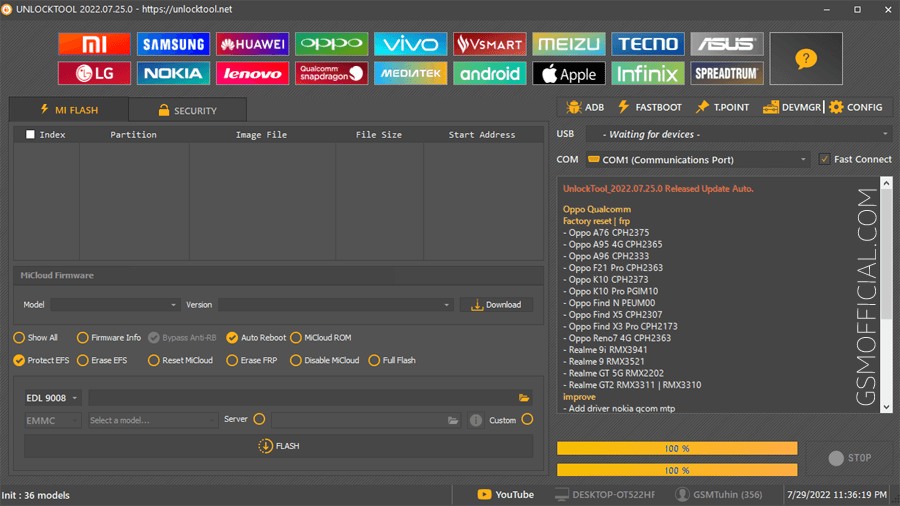
Unlock Tool is a fantastic offline PC setup designed for mobile enthusiasts. This tool offers standalone installation and is compatible with Windows 10 and Windows 11, as well as older versions of Windows. It’s an essential resource for Indian users looking to manage their mobile devices efficiently. The latest version (2026-04-12-0) provides free trial/official access to multiple features, making it a must-have tool for your PC. You can check an overview of features here.
What This Mobile Tool Does?
The Unlock Tool is designed to cater to various GSM tasks. Primarily, it helps users unlock the bootloader of their devices, which is especially useful for Xiaomi and Samsung users. Additionally, it supports writing stock ROMs and resetting various locks, such as screen lock and FRP (Factory Reset Protection).
Imagine you’re stuck on the boot screen, or you’ve forgotten your pattern lock. With Unlock Tool, you can quickly reset your device or flash a new firmware to bring your phone back to life without hassle.
Tools Key Features
- Cross-Brand Compatibility: Works with Xiaomi, Samsung, Huawei, Oppo, Vivo, and more.
- Bootloader Unlock: Easily unlock the bootloader on your devices.
- FRP Reset: Bypass the Factory Reset Protection with ease.
- Stock ROM Flashing: Flash stock ROMs for device recovery.
- Easily Reset Lock Pattern: Get into your device by resetting the lock pattern.
- Intuitive UI: User-friendly interface for smooth navigation.
- Driver Installation: Comes with drivers for effective device connection.
- Backup Options: Safely backup your data before making changes.
- Security Features: Ensure your device remains secure during the process.
- Instructions Provided: The tool includes step-by-step tutorials for users.
- Hardware Support: Supports multiple USB drivers like MediaTek and Qualcomm.
- Portable Version: Use it without hassle; no need for installation (in portable form).
- Multi-Language Support: Available in various languages, making it accessible.
- Regular Updates: Frequent updates ensure you stay ahead of issues.
- GPS and Network Fix: Ability to fix GPS and network issues for better performance.
- 86 Different Models Supported: Broad compatibility with various smartphone models.
- Community Support: Engage with other users and experts for assistance.
System Requirements
| OS | Windows 10 / 11 |
| CPU | Intel i3 or higher (or equivalent) |
| RAM | 4GB minimum |
| Storage | 2GB of free space |
How To Download and Install?
To begin, download the offline setup file from the links below. Once downloaded, extract the ZIP package to your desired location on your PC.
Follow the steps for a standalone installation:
- Double-click on the Unlock Tool setup file to start the installation.
- Install any required drivers when prompted.
- After the installation, launch the tool from the shortcut created on your desktop.
- Make sure your device is connected via USB in the appropriate mode.
Here are some common errors and fixes:
| Error | Fix |
|---|---|
| Device not detected | Ensure you have the correct drivers installed. |
| Tool crashes during launch | Check if you’re running the latest version. |
| Insufficient permissions | Run the tool as an administrator. |
| Connection timeout | Try a different USB port or cable. |
Performance And Usage of Unlock Tool Download 2026-04-12-0 (Latest version)
The performance of the Unlock Tool is impressive. Users often report quick unlock times, generally taking only a few minutes to bypass lock screens or reset devices. The interface makes it easy to navigate through multiple options.
Whether you’re flashing a new ROM or resetting a pattern lock, most tasks can be accomplished with just a few clicks, making it ideal for both novices and savvy users alike.
Unlock Tool Download 2026-04-12-0 (Latest version) Pros And Cons
- Pros:
- Cross-platform support for many brands.
- User-friendly interface.
- Fast operation with minimum hassle.
- Regular updates keep the tool relevant.
- Eliminates the need for authorized service centers.
- Community-driven support and troubleshooting.
- Cons:
- May require an internet connection for some features.
- Requires basic knowledge of GSM technology.
- Some advanced features may be locked behind registration.
- Not all device models are supported.
- Occasional bugs can occur on older Windows versions.
- Initial setup might intimidate first-time users.
Related Tools
If you find the Unlock Tool beneficial, you may also want to explore other useful tools such as the UMT Huawei Suit, which provides additional functionalities, or the GSM Shield ISP Tool, designed for ISP work. Similarly, if you need comprehensive Unlock Tool features for different brands, make sure to check various alternatives.
Each of these tools brings its own strengths, so it’s worth exploring them to find the best fit for your specific needs and tasks. Whether you are flashing ROMs, unlocking bootloaders, or troubleshooting network issues, these tools can be vital in your mobile repair toolkit.
FAQ
What is the primary function of the Unlock Tool?
The Unlock Tool is used for flashing stock ROMs, unlocking bootloaders, and resetting lock patterns on various mobile devices.
Is the Unlock Tool free?
Yes, but certain advanced features may require a purchase or registration.
Which brands are supported by Unlock Tool?
It supports numerous brands, including Xiaomi, Samsung, Huawei, Oppo, Vivo, and more.
How to resolve if my device is not detected?
Check if the correct drivers are installed and ensure the device is in the appropriate mode for connection.
What is the minimum system requirement for running Unlock Tool?
The minimum requirement is Windows 10 or 11, 4GB RAM, and 2GB of free storage.
Can I flash my device using Unlock Tool?
Yes, you can flash stock ROMs using this tool for supported devices.
What should I do before using the Unlock Tool?
Always take a backup of your important data to avoid data loss.
Is there a risk of bricking my device?
Improper use of the tool can lead to bricking your device; always follow the tutorial provided.
How often is Unlock Tool updated?
Updates are released regularly to enhance stability and add new features.
Where can I download the Unlock Tool?
You can download it from various hosting platforms. Always ensure you are downloading from a trusted source.
Is the Unlock Tool safe to use?
Yes, it is scanned for viruses and is considered safe when downloaded from reliable sources.
Conclusion
In 2026, the Unlock Tool stands out as an essential asset for mobile users, particularly in India. Its features cater to a wide audience looking to manage their devices efficiently without going through authorized service channels. By using this tool, you empower yourself to take control over your mobile devices efficiently, ensuring you are always a step ahead in mobile management.
Download Links for Unlock Tool 📥
Here are the download links for the Unlock Tool, along with additional information. You can choose your preferred hosting site to download the file.
Latest Version 🌟
| File Name | File Size | Download Link |
|---|---|---|
| Unlock Tool Download 2026-04-12-0.zip | 198 MB | Download (MediaFire) 📁 Download (G-Drive) 📄 |
Previous Versions 📜
| Old Version | Link 1 (MediaFire) | Link 2 (Google Drive) |
|---|---|---|
| 2026-02-25-0 | Direct 📥 | G-Drive 🗂️ |
| 2025.09.04.0 | Direct 📥 | G-Drive 🗂️ |
| 2025.08.15.0 | Mega 🌐 | G-Drive 🗂️ |
| 2025.06.28.0 | Mega 🌐 | G-Drive 🗂️ |
| 2025.06.17.0 | Mega 🌐 | G-Drive 🗂️ |
| 2025.06.1.0 | Mega 🌐 | G-Drive 🗂️ |
| 2025.05.26.0 | Mega 🌐 | G-Drive 🗂️ |
| 2025.05.20.0 | Mega 🌐 | G-Drive 🗂️ |
| 2025.05.17.0 | Mega 🌐 | G-Drive 🗂️ |
| 2025.05.10.0 | Mega 🌐 | G-Drive 🗂️ |
| 2025.04.30.0 | Mega 🌐 | G-Drive 🗂️ |
| 2025.02.15.0 | Mega 🌐 | G-Drive 🗂️ |
| 2025.01.26.0 | Mega 🌐 | G-Drive 🗂️ |
Additional Files 📂
| File | Link 1 | Link 2 |
|---|---|---|
| UnlockTool Ramdisk File | MediaFire 📂 | – |
| UnlockTool Driver | AFH 📂 | G-Drive 🗂️ |
Feel free to choose the download links that suit you best! Happy downloading! 🚀